
Standalone app, VST3 and Audio Unit
Chop & Pitch
Taking slices to the next dimension.
A sample chopper and beat slicer. Chop any audio and play it as an instrument. Rearrange it, modulate every slice, layer it, run it through your own effects, then resample it all down and go again.
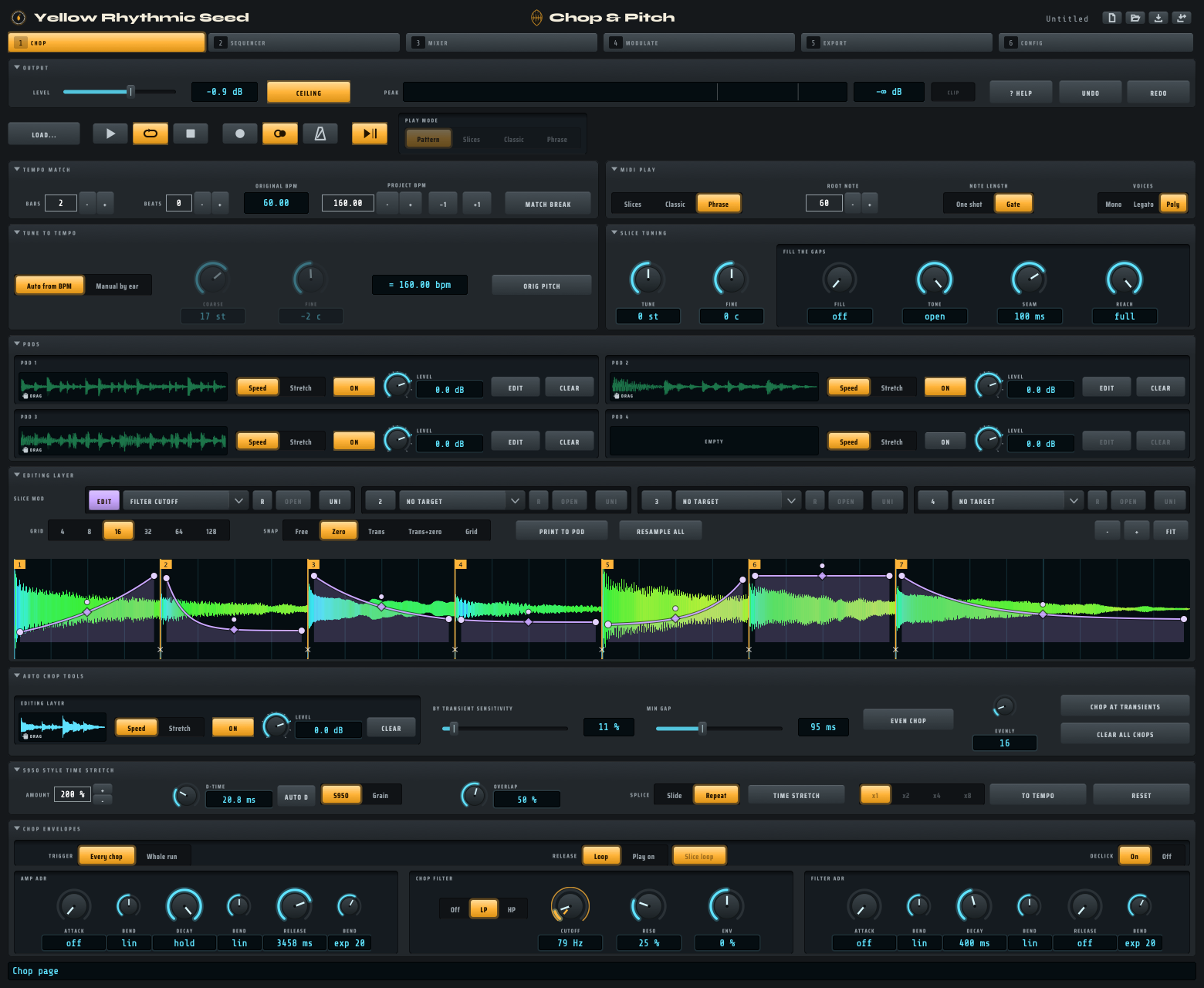
Chop: cut the audio, tune the slices, draw a slice mod over them, and shape every chop with its own filter and envelopes.
What it does
One instrument, many ways in.
- 1
Chop any audio
Cut a break, a riff or a whole loop at its hits, on the grid, or by hand.
- 2
Play your chops as an instrument
One slice per key. Or one slice up and down the keyboard, at pitch. Or a whole phrase from a single key. Mono, legato or poly.
- 3
Rearrange it
Draw a new pattern on the built-in roll, or play the slices from your DAW's sequencer.
- 4
Slice mod modulation
Four slice mods. Draw an envelope over each slice, shape it freely, and aim it at the app's controls or any knob on a VST.
- 5
Layer your chops
Print what you hear into one of four Pods, then load any other audio and chop that on top.
- 6
Layer polyrhythms
Each Pod keeps its own length, so loops of different lengths turn against each other.
- 7
Your own VST effects
Load your plugins on the built-in mixer: inserts on every channel, and send effects.
- 8
Automate them with the MSEG
Eight envelopes you draw yourself. Aim each one at the app's controls, or any knob on a VST.
- 9
Resample, rinse, repeat
Render everything you hear back into one sample. Chop that. Go again.
The idea
Shape. Render. Chop.
Make that sample yours.
Shape the sound
Envelopes, filter, effects, modulation, a sequence.
Render it all down
Resample all prints what you hear, tails and all, into one new sample.
Chop the result
The new sample is yours to cut again. Nothing is applied twice.
Take it anywhere
Play it in your DAW, or export the chops to a sampler or any other device.
Videos
Watch it work.
Chop & Pitch in two and a half minutes
Chopping, rearranging, slice mods, layering, effects, the MSEG and resampling.
Tutorial 1: the Config page
Set it up: pick your sound card, tick your MIDI keyboard and scan for your effect plugins. 6 minutes.
Tutorial 2: the Chop page
Chop any audio, tune the slices, draw a slice mod over them and shape every chop. 34 minutes.
Tutorial 3: the Sequencer page
Arrange your slices into a new groove on the roll, loop them and shape every note. 34 minutes.
Tutorial 4: the Mixer page
Five channels, your own VST and Audio Unit effects, aux sends and EQ. 6 minutes.
Tutorial 5: the Modulate page
Draw a shape and aim it at a control: the eight MSEGs. 13 minutes.
The details
What you get.
The instrument
- A standalone app, and a VST3 and Audio Unit plugin for your DAW - Logic Pro and GarageBand included
- Follows your DAW's tempo and transport
- Up to 128 slices, one per key
- Speed or time-stretch to fit the project tempo
- Amp and filter envelopes on every chop
The sound design
- Four slice mods and eight MSEGs
- A five-channel mixer with EQ, inserts and sends
- Hosts your own VST3 effects
- A sampler-style time stretch, as an effect
- Resample all, with the tails kept
Getting it out
- Export your chops as WAV files
- Drag a chop straight out to your DAW or the Finder
- Save the whole session as one project file
- Write Akai S950 and S1000 disks, if you have one
Get Chop & Pitch
Out now.
Free
If you like it, you can leave a donation when you download it. Any amount, or nothing.
For macOS, on Apple silicon. A standalone app, and a VST3 and Audio Unit plugin.
A Windows version is in testing.
Download Chop & PitchIf the download in the shop shows an "Access Denied" page, please use the download link in the order email you receive instead.
The quick start and the full manual are on the Support page.